Claude Computer Use, Dispatch, and Google AI Studio
Mar 27, 2026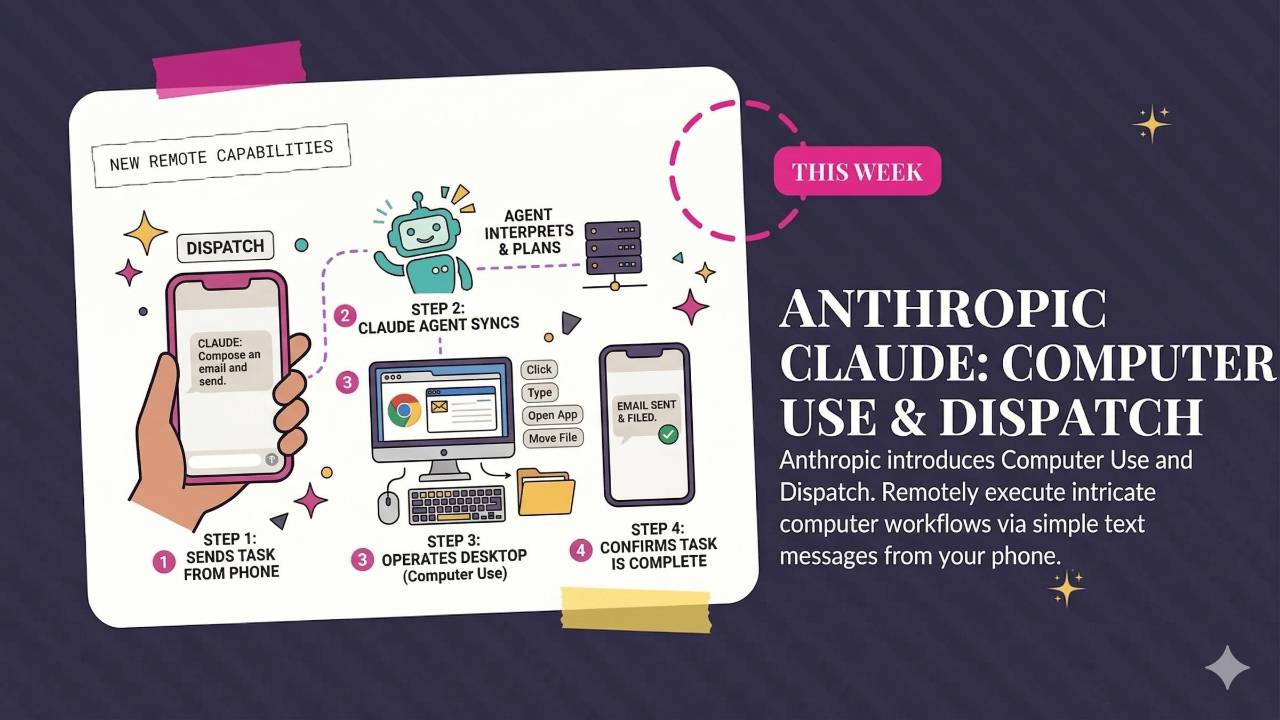
Claude gains computer use and phone-based control through Dispatch, while Claude Code adds channels and recurring tasks. Read about OpenAI's planned desktop superapp, Google AI Studio's app-building tools, and importing chat context into Gemini.
Weekly AI Highlights: March 21 - March 27, 2026
What Small Business Owners Need to Know Right Now
Reader,
Claude can now use your computer. Open apps. Navigate your browser. Fill in spreadsheets. Move files around. All while you're somewhere else.
You text it from your phone. It does the work on your Mac. You come back to finished work.
I've been testing it since the day it launched and I wrote a full breakdown on the blog. But first, here's this week's roundup.
1. Claude Can Now Use Your Computer (and You Can Control It from Your Phone)
Claude just keeps outdoing itself. I don't even know how else to say it.
Anthropic released two things that work together: Computer Use and Dispatch. Computer Use lets Claude take control of your screen. It can click, type, open apps, navigate Chrome, fill out forms, and move files. When Claude has a built-in connector for a service (like Slack or Google Calendar), it uses that first. When it doesn't, it literally operates your computer to get the job done.
Dispatch is the other half. It gives you one continuous conversation with Claude that syncs between your phone and your desktop. You text Claude a task from your phone. Claude does the work on your computer. It messages you when it's done. You come back to finished work.
Mac only right now. Available on Pro ($20/mo) and Max ($100/mo) plans. You need to download the desktop app and turn on Browser Use and Computer Use in Settings > Desktop App > General.
Source Links: Source: 1. Claude Can Now Use Your Computer (and You Can Control It from Your Phone)
Source: 1. Claude Can Now Use Your Computer (and You Can Control It from Your Phone)
2. Claude Code Gets Channels and Recurring Tasks
Two more Claude Code updates worth knowing about, even if you're not a developer.
Channels lets developers message their Claude Code session through Telegram or Discord. It's a texting bridge between your phone and whatever Claude Code is working on. You can check progress, give instructions, or approve actions without being at your desk. (This is separate from Dispatch, which is the Cowork version for non-developers.)
Recurring tasks let you schedule prompts to run automatically on a timer. Cowork has had scheduled tasks for a while now, but having it inside Claude Code is a big deal for developers. Imagine setting it to check error logs every few hours or run a report every Monday morning. Set it once. Claude handles the rest. I'd imagine that saves a lot of time for anyone building software.
Source Link: Source: 2. Claude Code Gets Channels and Recurring Tasks
3. OpenAI Is Building a "Superapp" That Puts Everything in One Place
OpenAI is merging ChatGPT, Codex (their coding tool), and the Atlas web browser into a single desktop app.
The reason is pretty straightforward: people weren't using Codex and Atlas as standalone products. Fidji Simo, who runs OpenAI's app division, said they "realized we were spreading our efforts across too many apps." So now they're folding everything into ChatGPT, where the users already are.
What this means is that the ChatGPT desktop app is about to handle browsing the web, writing and running code, and chatting with the AI, all in one window.
Source Link: Source: 3. OpenAI Is Building a "Superapp" That Puts Everything in One Place
4. Google Turned AI Studio Into a Full App-Building Platform
Google didn't announce a big plan. They just did it.
Google AI Studio used to be a prompt playground for testing Gemini models. You could build demo apps, and technically you could connect databases and logins through Firebase, but the setup was tedious. You had to go to the Firebase console, configure everything manually, and wire it all together yourself.
Now the AI handles that for you. You describe what you want in plain language, and the new Antigravity coding agent builds it. Not a prototype. A real app with a backend, user authentication, and data storage. It detects when your app needs a database or login system and sets it up automatically. That's the part that changed.
If you love Replit and Loveable, you’ll love Google AI Studio’s “Build” feature.
And it's free for anyone with a Google account.
Source Link: Source: 4. Google Turned AI Studio Into a Full App-Building Platform
PROMPT OF THE WEEK
CREATE ON-BRAND SLIDE DECKS IN NOTEBOOKLM (NO DESIGN SKILLS NEEDED)
We tested this on our strategy call and the results were so good I had to share it. You can get NotebookLM to create slide decks that actually match your branding. No Canva. No designer. No tweaking colors for an hour.
Here's how:
1 - Go to NotebookLM and create a new notebook.
2 - Upload your brand guide as a PDF source. (If you don't have one, create one first. Include your colors, fonts, logo description, and visual style.)
3 - Upload the content you want turned into a slide deck as a second source. This can be plain text, meeting notes, a blog post, anything.
4 - Select ONLY those two sources. (This is important. Deselect everything else.)
5 - Click the Slide Deck option in the Studio panel, and use this prompt:
NotebookLM will generate a fully designed slide deck that pulls your content AND your brand styling. We tested it with a random science project topic and our own brand guide, and it nailed our colors, fonts, and layout on the first try.
Pro tip: Export your brand guide as a PDF before uploading. NotebookLM reads PDFs more reliably than other formats.
My Branding:
NotebookLM Output:
Google Wants to Make It Easy to Switch to Gemini
Google added a tool that lets you bring your ChatGPT (or Claude) chat history and memory into Gemini -> gemini.google.com/import It works in two parts.
Part 1: Memory Transfer Gemini gives you a prompt to paste into your current chatbot. That chatbot generates a summary of everything it knows about you. You copy that back into Gemini… and now it already understands your preferences, tone, and background.
Part 2: Chat Import You can also export your full conversation history from ChatGPT (or another tool) as a .zip file and upload it into Gemini.
It pulls in your past chats so you keep your context.
The file needs to be under 5GB.
Available now for free and paid Gemini users.
Comments
If any of this made you think differently about how you want to work with AI, hit reply and let me know. I read every message. Your questions shape what I cover next.
Have a great weekend,
Founder, Front Row AI Club
PS. Was this newsletter forwarded to you? Sign up to get it in your inbox.
Whenever you’re ready, here are 3 ways I can help you:
1. Join the Front Row AI Club. I'll show you exactly how to turn AI into an indispensable part of your business without the head-banging learning curve.
2. Interested in 1:1 coaching or consulting? Book a session here.
3. Want me to speak to your group or give a training? It’s my favorite thing!
You can find my previous newsletter articles here: The Front Row AI Report
© 2026, Front Row AI Club. All rights reserved.