Manus Instagram Workflows, Google Vids, and Claude Code
Apr 03, 2026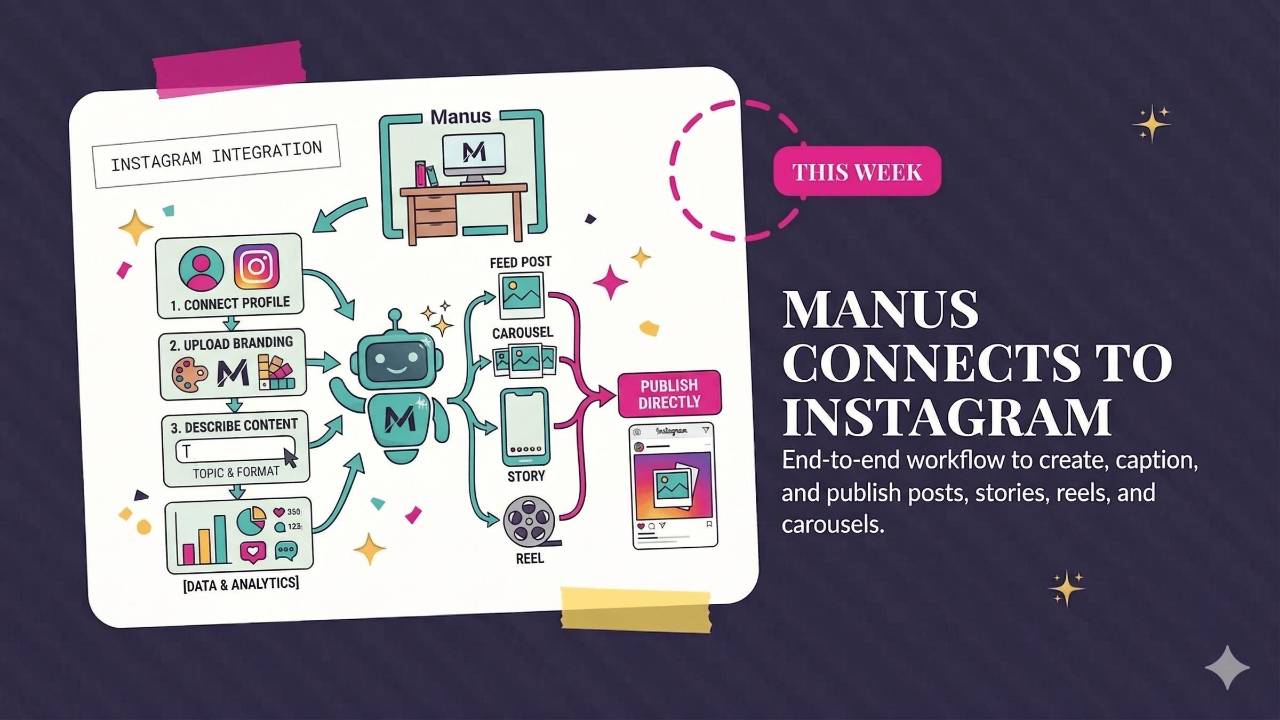
Jen tests Manus with Instagram, Google Vids adds video and music tools, and Meta updates its AI glasses. This roundup also covers computer use in Claude Code, with a prompt for keeping a useful record of your Claude Cowork sessions.
Weekly AI Highlights: March 28 - April 3, 2026
What Small Business Owners Need to Know Right Now
Reader,
This week has been pretty quiet on the AI news front. And honestly, I kind of like it. The last few weeks have been a firehose of updates. Slower weeks are good. They give you time to actually try the things we talk about here.
That said, a few things worth knowing. Claude Code got Computer Use (the developer version of what Cowork already has). Meta launched prescription AI glasses with some genuinely useful new features. Google Vids (my darling) got a big upgrade. And I connected Manus to my Instagram and it is basically psycho. It is so good. More on that in a second.
Let's get into it.
1. I Connected Manus to My Instagram (and It Did Everything)
This isn't brand new, but I tried it this week and I have to talk about it.
Manus now has an Instagram connector. You connect your professional Instagram profile, and Manus can create content, write captions, generate graphics, and publish directly to your feed. Posts, carousels, stories, and reels.
Here's what happened: I uploaded my branding to Manus and asked it to create an Instagram carousel. It did everything. The graphic, the caption, the hashtags, the posting. All from one place.
It also pulls your engagement data (reach, likes, comments, shares, saves) so you can see what's working and adjust.
Source Link: Source: 1. I Connected Manus to My Instagram (and It Did Everything)
2. Google Vids Just Got a Big Upgrade
Google Vids, their AI video editor, keeps getting better. The latest update adds support for Veo 3.1 (Google's newest video AI, which generates 8-second clips) and Lyria 3 for music and sound effects. Every user gets 10 free Veo video generations per month.
You can now use plain language prompts to direct the AI-generated avatars in your videos. Tell them to interact with a product, hold a prop, change their outfit, or stand in a new background. All through text. Google says the avatars stay consistent even as you change scenes and directions.
You can also now publish finished videos directly to YouTube from inside Google Vids. No downloading, no re-uploading. The exported videos default to private, so you can review everything before making it public. They also added a Chrome extension for screen recording with audio.
Source Link: Source: 2. Google Vids Just Got a Big Upgrade
3. Meta Launches Prescription AI Glasses (Plus New AI Features)
Yes, the prescription feature is cool (you already could add prescription lenses, but these are the first models built from the ground up for all-day prescription wear), but it’s the software updates that caught my attention:
Nutrition tracking: Take a photo of your meal or just tell it what you're eating. Meta AI logs the nutrition details and adds them to a food log in the Meta AI app. Over time it gives you personalized insights.
WhatsApp summaries: Say "Hey Meta, catch me up on my messages" and get a summary of your group chats. You can ask follow-up questions like "What did Jamie suggest for dinner?" All processed on-device.
Neural Handwriting: Write with your finger on any surface to reply to messages silently. Coming to iMessage too.
Source Link: Source: 3. Meta Launches Prescription AI Glasses (Plus New AI Features)
4. Claude Code Gets Computer Use
Last week we covered Computer Use for Cowork. Now Claude Code, the developer version, has it too.
This means developers can ask Claude to build something, then have Claude open the app, click through the interface, find bugs, fix them, and verify the fix. All from the command line. In one prompt, Claude can write the code, compile it, launch it, test it visually, and patch whatever breaks.
This is developer-focused. If you're not building software, the Cowork version from last week is the one that matters to you. But it's worth knowing that Claude keeps expanding what it can do on your actual computer, not just inside a chat window.
Mac only. Pro and Max plans. Requires Claude Code v2.1.85 or later.
Source Link: https://code.claude.com/docs/en/computer-use
PROMPT OF THE WEEK
LOG YOUR CLAUDE COWORK SESSIONS (YOUR FUTURE SELF WILL THANK YOU)
If you're using Claude Cowork, run this prompt at the end of every work session. It creates a markdown file (.md) saved directly to your working folder that captures what you decided, what came up, and what's next.
This does two things. First, it gives you a running log of everything you've worked on, organized by date. Second, it saves your usage limits. Long conversations get expensive fast in Claude because it re-reads the full chat history with every new message. Logging and starting fresh keeps your costs down.
At the end of your session, paste this:
Tip: Set up a keyboard shortcut so you don't have to type this every time. On Mac, go to System Settings > Keyboard > Text Replacements. On Windows, use a free tool like Espanso. Pick a short trigger like ";log" and have it expand into the full prompt.
Source: Blazing Zebra
If You're a VA (or You Work with a VA)
The next cohort of our CAIVA certification starts April 16. It's a 4-week live program that teaches virtual assistants how to actually use AI in client work.
What's inside:
- 4 live training modules (AI foundations, workflow automation, premium service packages, client integration)
- Hands-on templates, prompts, and SOPs you can use right away
- 5 ready-to-sell AI service packages with pricing and scripts
- Real-time coaching and a private community
- Certification you can put on your website and LinkedIn
If you're a VA who wants to stand out, or you have a VA on your team who would level up from this, take a look at caiva.net.
LEARN MORE HEREComments
If any of this made you think differently about how you want to work with AI, hit reply and let me know. I read every message. Your questions shape what I cover next.
Have a great weekend,
Founder, Front Row AI Club
PS. Was this newsletter forwarded to you? Sign up to get it in your inbox.
Whenever you’re ready, here are 3 ways I can help you:
1. Join the Front Row AI Club. I'll show you exactly how to turn AI into an indispensable part of your business without the head-banging learning curve.
2. Interested in 1:1 coaching or consulting? Book a session here.
3. Want me to speak to your group or give a training? It’s my favorite thing!
You can find my previous newsletter articles here: The Front Row AI Report
© 2026, Front Row AI Club. All rights reserved.