Claude Free Memory, GPT-5.4, and NotebookLM Video Updates
Mar 05, 2026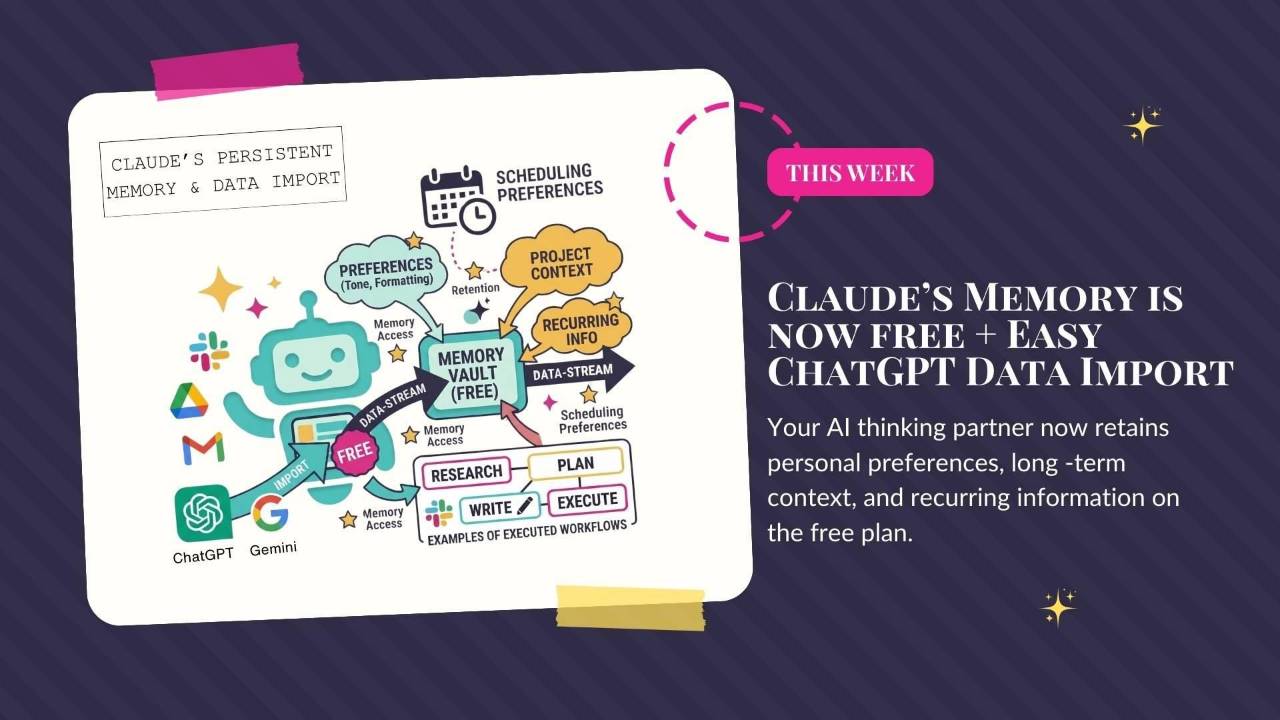
Claude makes memory free and adds voice mode for developers, while OpenAI releases GPT-5.3 Instant and GPT-5.4. This roundup also covers NotebookLM's infographic and cinematic-video options, with useful Claude settings for beginners.
Weekly AI Highlights: February 28 - March 6, 2026
What Small Business Owners Need to Know Right Now
Reader,
Claude had the kind of week most companies dream about. #1 app in the country. Free memory for everyone. Voice commands for developers. And half the internet is trying to figure out how to move their ChatGPT data over.
Meanwhile, OpenAI released an update specifically because users kept complaining that ChatGPT was too preachy and annoying. And then, as I was literally wrapping up this newsletter, they dropped GPT-5.4. Just two days after GPT-5.3. These people do not rest.
And NotebookLM quietly dropped two updates that are going to make a lot of you very happy.
Let me break it all down.
1. Claude's Memory Is Now Free (and You Can Import Your ChatGPT Data)
Claude's memory feature is now available on the free plan. You can save preferences, context, and recurring information. You can also import saved memories and export them whenever you want.
For anyone using Claude as a long-term thinking partner, this is huge. It means better continuity without paying for a subscription. (I still think it’s worth paying for Claude, though. The paid version performs much better overall).
They also introduced an import tool that makes switching from ChatGPT or Gemini dead simple. Go to Settings → Capabilities → Import Memories. Claude gives you a prompt. You paste that prompt into ChatGPT, it exports everything it knows about you, and you paste the result back into Claude. Your new assistant starts with all your existing context. No starting over.
Source Link: Source: 1. Claude's Memory Is Now Free (and You Can Import Your ChatGPT Data)
ACTION STEP (DO THIS WEEK)
Go to Claude's Settings → Capabilities → Toggle on "Generate memory from chat history". If you've been using ChatGPT or Gemini, use the import tool to bring your data over. It takes less than a minute. You'll immediately notice the difference in how Claude responds to you.
2. Claude Code Gets Voice Mode
Anthropic added voice mode to Claude Code, their AI coding tool. Instead of typing out every command, you can now just talk. Type /voice to turn it on, hold the space bar, speak your request, and let go. Claude Code does the rest.
You can mix and match too. Speak the big-picture instruction, type the specific file name or URL. No switching between tools.
Source Link: Source: 2. Claude Code Gets Voice Mode
3. ChatGPT's New GPT-5.3 Instant Fixes the "Cringe" Problem
OpenAI released GPT-5.3 Instant on March 3, and the headline here is honesty: they basically admitted that ChatGPT had become annoying.
The previous version would refuse questions it should have answered, lecture you before giving information, and open responses with things like "Stop. Take a breath." Enough users complained (and uninstalled the app) that OpenAI made it a priority.
GPT-5.3 Instant is now the default model for all ChatGPT users. The update cuts hallucinations by nearly 27%, reduces unnecessary refusals, and drops the preachy tone. Web search results are better synthesized too, so you get actual answers instead of a list of links.
Source Link: Source: 3. ChatGPT's New GPT-5.3 Instant Fixes the "Cringe" Problem
4. OpenAI Just Dropped GPT-5.4
OpenAI just released GPT-5.4, only two days after GPT-5.3.
They're calling it their most capable model yet. It comes in three versions: GPT-5.4, GPT-5.4 Thinking, and GPT-5.4 Pro. The big numbers: up to 1 million token context window, 33% fewer errors than GPT-5.2, and it now has native computer use built in, meaning it can actually operate your computer and work across apps.
They also launched financial plugins for Excel and Google Sheets. So yeah. A lot.
I have a Team account and don’t have access yet, so I can’t tell you how it actually feels to use. Still waiting on it.
Source Link: Source: 4. OpenAI Just Dropped GPT-5.4
5. New Customization Options for Infographics in NotebookLM
You know I love NotebookLM. And it just keeps getting better.
They added 10 visual style presets for infographics, things like editorial, clay, kawaii, and more, plus a custom option where you describe exactly the look you want. So instead of getting one default style and hoping for the best, you actually have creative control now.
I keep saying NotebookLM is one of the most underrated tools out there. These updates are a perfect example of why. You upload your content, and it gives you polished visuals that used to require Canva or a designer.
Source Link: Source: 5. New Customization Options for Infographics in NotebookLM
6. NotebookLM Introduces Cinematic Video Overviews
When I first saw this, I was like, oh, this is old news. NotebookLM already does video overviews. But this is different.
The old video overviews were basically narrated slides. These new Cinematic Video Overviews are fully animated. Real motion, scene transitions, visuals that actually match your content. Not a slideshow with a voiceover. Actual video.
You upload your documents, and NotebookLM handles the script, the visuals, the pacing, all of it. The result looks like something you'd hire a video editor to produce.
Right now it's only available to Google AI Ultra subscribers, and only in English. I don't have access yet, but I am definitely trying this the second I can.
Source Link: Source: 6. NotebookLM Introduces Cinematic Video Overviews
3 Claude Settings to Enable If You're a Beginner
If you're new to Claude (or just downloaded it this week like a million other people), there are three settings worth turning on right away. These make Claude way more useful from day one.
First: Import memory from other AI tools
If you haven't done the memory import yet (I covered the steps here), do it now. Settings → Capabilities → Import Memories. It takes less than a minute. The biggest single thing you can do to make Claude actually useful on day one.
Second: Add your memory to Gemini Instructions (optional, but useful)
If you also use Gemini, you can paste that same memory summary into Gemini → Settings → Instructions. This keeps your context consistent across tools.
Third: Enable Connectors so Claude can access your real data
Go to Settings → Connectors and connect tools like Google Drive, Notion, or GitHub. This allows Claude to pull files, analyze documents, and generate outputs using your actual work.
Once these three are set up, Claude stops feeling like a blank slate and starts behaving like a real assistant.
PROMPT OF THE WEEK
GET A BETTER RESPONSE FROM YOUR AI
Make the AI debate itself.
Instead of asking one question and accepting the answer, try this prompt structure:
This forces the model to explore multiple angles, weigh conflicting evidence, and synthesize a stronger conclusion. It's especially powerful for decisions where you're stuck between options.
Bonus: If the answer matters, follow up with: "Now argue against your own conclusion. What did you miss?" You'll be surprised how often the AI finds real holes in its own reasoning.
Source: theneuron.ai
My Friend Catherine Dove is hosting an amazing retreat!
This is not AI related, but it is something you might want to know about if you are craving some time to catch your breath and work on your business in paradise, with other like-minded peeps.
Six days on Bayahibe Beach in the Dominican Republic. Catherine will help you:
- Reposition your expertise in a market flooded with AI content
- Rebuild authority with today's more skeptical buyers
- Create predictable revenue without relying on systems that stopped working
- Find your real competitive edge (the one AI can't replicate)
This isn't about starting over. It's about figuring out what works NOW.
You can learn more about Catherine, and her retreat, here -> www.herprofitretreat.com
Use the code JenRetreat to save $1,000 on registration.
Comments
If any of this made you think differently about how you want to work with AI, hit reply and let me know. I read every message. Your questions shape what I cover next.
Have a great weekend,
Founder, Front Row AI Club
PS. Was this newsletter forwarded to you? Sign up to get it in your inbox.
Whenever you’re ready, here are 3 ways I can help you:
1. Join the Front Row AI Club. I'll show you exactly how to turn AI into an indispensable part of your business without the head-banging learning curve.
2. Interested in 1:1 coaching or consulting? Book a session here.
3. Want me to speak to your group or give a training? It’s my favorite thing!
You can find my previous newsletter articles here: The Front Row AI Report
© 2026, Front Row AI Club. All rights reserved.